After entering credentials and attempting to login to Salesforce, the API user is denied access to the application and is typically accompanied by a Login History Status of "Failed: Not approved for access".

Solution:-
Update OAuth policies and set Permitted Users to "All users may self-authorize".
Step 1) Open the connected App the click on Manage button.

Step 2) Then click on Edit policies button
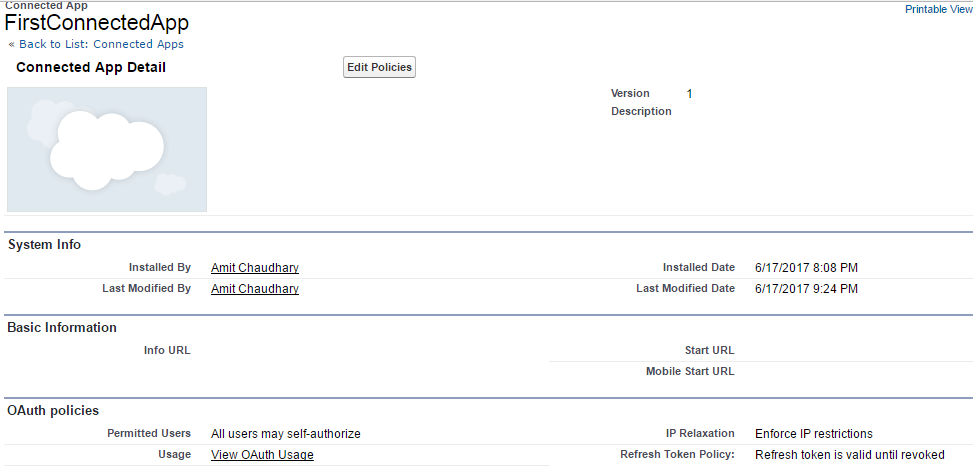
Step 3) then update "OAuth policies"

Please check below post to resolve this issue
1) https://help.salesforce.com/articleView?id=000212208&language=en_US&type=1
Thanks
Amit Chaudhary

Great article. illustration using screenshots solved the problem in much much less time..
ReplyDeleteThanks Amit.
Thank you so much bro you save me
ReplyDeleteThe blog outlines a straightforward resolution for the common Salesforce authentication error “Failed: Not approved for access”, which occurs when an API or connected app login attempt is blocked due to restrictive OAuth settings; by adjusting the Connected App’s OAuth policies so that “All users may self‑authorize”, administrators can quickly restore authorized access and prevent this issue from recurring, improving integration reliability.
ReplyDeleteunstitched men suit
driveway resurfacing canberra