Showing posts with label Custom Setting. Show all posts

Tuesday, 9 December 2014

How to Update custom setting without granting them Customize Application access


Requirement :-
Recently I was working on one requirement where i need to provide the user to update custom setting data without providing the customize application access because customize application is also depend on manager translation,view setup and configuration. But on that profile we dnt want to provide View Setup.
Then i decided to write a visual force page. But when we bind the custom setting with <apex:inputField> field was also coming in read only mode. For that I come up with below solution.

Solution :-
If we will bind custom setting directly with <apex:inputField without customize application access then field will come in read only mode. For that we need to mapped our custom setting data in Wrapper class or variable.

Page :-


<apex:page controller="CustomSettingController">
<apex:form >
<apex:pageBlock mode="edit" id="PB" title="Custom Settings">
<apex:pageMessages />

<apex:pageBlockButtons location="Top">
    <apex:commandButton action="{!Edit}" value="Edit" rendered="{!Not(isEdit)}" reRender="PB"/>
    <apex:commandButton action="{!Save}" value="Save" rendered="{!isEdit}" reRender="PB"/>
    <apex:commandButton action="{!Cancel}" value="Cancel" rendered="{!isEdit}" reRender="PB"/>
</apex:pageBlockButtons>

<apex:pageBlockSection rendered="{!Not(isEdit)}" id="PB1" >
 <apex:outputField value="{!custSetting.Number_Of_Days__c}"/>         
 <apex:outputField value="{!custSetting.User_name__c}"/>            
</apex:pageBlockSection>

<apex:pageBlockSection rendered="{!isEdit}" id="PB2" title="Update Commerce Settings Data">
   <apex:pageBlockSectionItem >
    <apex:outputLabel value="{!$ObjectType.Custome_Settings__c.fields.Number_Of_Days__c.Label}" />            
    <apex:inputText value="{!number_Of_Days}"/>            
 </apex:pageBlockSectionItem> 
 <apex:pageBlockSectionItem >
  <apex:outputLabel value="{!$ObjectType.Custome_Settings__c.fields.User_name__c.Label}" />            
  <apex:inputText value="{!strName}"/>            
</apex:pageBlockSectionItem>

</apex:pageBlockSection>

</apex:pageBlock>
</apex:form>
</apex:page>


Class:-

public with sharing class CustomSettingController {

public Custome_Settings__c custSetting {get;set;}
public Boolean isEdit {get;set;}
public Decimal number_Of_Days{get;set;}
public String strName{get;set;}


    public CustomSettingController()
    {
        custSetting = [select id , Number_Of_Days__c,User_name__c from Custome_Settings__c limit 1];

        number_Of_Days= custSetting.Number_Of_Days__c;
        strName = custSetting.User_name__c ;
    
        isEdit = false;
    }
    
    public void Cancel()
    {
        isEdit = false;
    }

    public void Edit()
    {
        isEdit = true;
    }
    
    public void Save()
    {
       try
       { 
        custSetting.Number_Of_Days__c =number_Of_Days;
        custSetting.User_name__c =strName;

        update custSetting;
        isEdit = false;
        ApexPages.addMessage(new ApexPages.Message(ApexPages.Severity.INFO, 'Data Saved Successfuly !!!' ) );
       }Catch(Exception ee){
           ApexPages.addMessage(new ApexPages.Message(ApexPages.Severity.ERROR, ee.getMessage()) );
       } 
    }
    

}


Thanks,
Amit Chaudhary

Thursday, 6 November 2014

Dynamic field mapping using Custom Settings


Some time we need to pass one object information to another object. So in this regards developer needs to write a trigger / apex code and needs to define each column mapping in the code. But it may be possible that in future field mapping will change or some new fields will introduce. For that we again need to change code.

In that case we need to create a dynamic field mapping between two object. That functionality  we can achieve with custom setting.
 In my last project i have done some code for same functionality  

Requirement :-

As per client requirement he want to store the Lead information in Pre - Lead and then he want to convert the pre- lead into Lead after some validation. 

Solution :

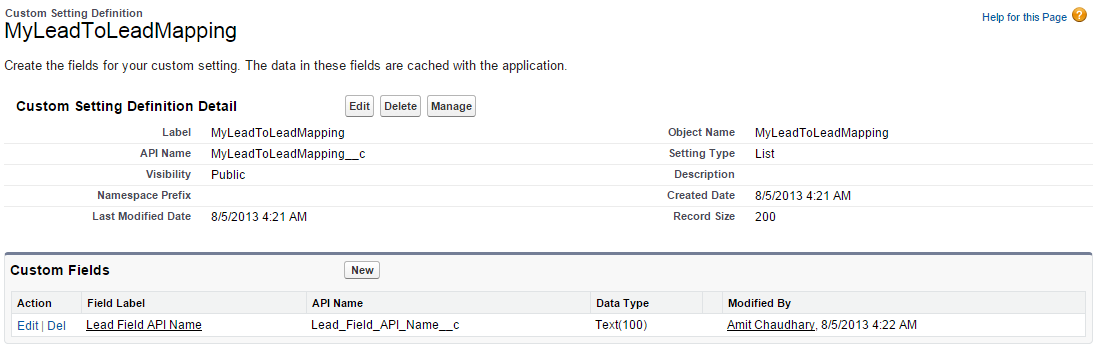
So for above requirement we have created a object Pre-lead and on same object we have created a button convert lead. while converting the pre- lead into lead we need to provide dynamic field mapping between two object. For that i have created the custom setting "MyLeadToLeadMapping__c" with one custom field "Lead_Field_API_Name__c"


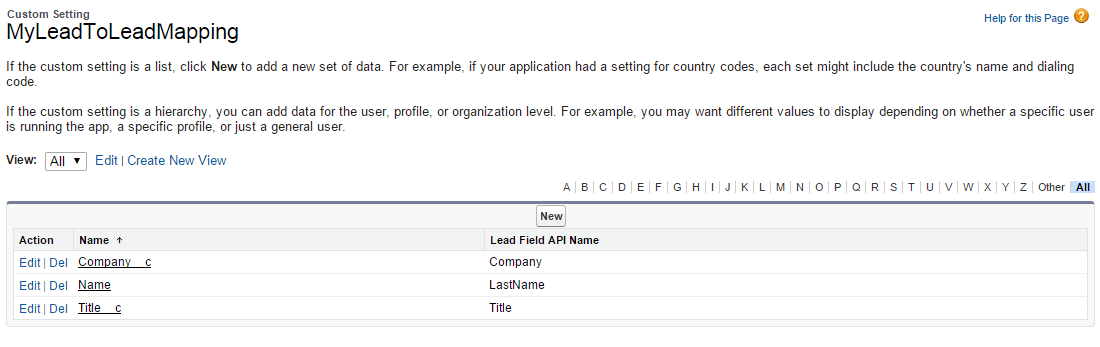
After that i have added the field mapping in custom setting


Code :---

public with sharing class ConvertMyLead
{
public Boolean showmessage{get;set;}
public string MyLeadid{get;set;}
public Lead LeadObj;
string qry = '';
    Map<string, string> MapMappingTable=new map<string,string>();

    public Pagereference MapLeadfields()
    {
        Pagereference pageref;
        Savepoint sp = Database.setSavepoint();
        try
        {
LeadObj=new Lead();
MyLeadid=ApexPages.currentPage().getParameters().get('MyLeadid');
getAllMapping();
qry = 'select ' + qry + 'id FROM My_Lead__c where id =: MyLeadid';
My_Lead__c MyLead = Database.query(qry);

for(String sMyLeadField: MapMappingTable.keySet())
{
String sLeadField = MapMappingTable.get(sMyLeadField);
LeadObj.put(sLeadField, MyLead.get(sMyLeadField));
}

LeadObj.OwnerID = UserInfo.getUserId() ;
LeadObj.status='new';
insert LeadObj;
showmessage=true;
pageref=new Pagereference('/'+LeadObj.Id);
return pageref;
        }
        catch(Exception ex)
        {
            Database.rollback(sp);
            ApexPages.Message msg = new ApexPages.Message(ApexPages.Severity.ERROR, ex.getMessage());
            Apexpages.addMessage(msg);
            return null;
       }
    }
 
    public Map<string,string> getAllMapping()
    {
        qry ='';
        try{
             for (MyLeadToLeadMapping__c mappingTableRec : MyLeadToLeadMapping__c.getall().Values())
             {
                if (mappingTableRec.Name != null && mappingTableRec.Lead_Field_API_Name__c != Null )
                {
                    MapMappingTable.put(mappingTableRec.Name , mappingTableRec.Lead_Field_API_Name__c);
                    qry += mappingTableRec.Name + ',';
                }
             }
        }
        catch(exception ex)
        {
            ApexPages.Message msg = new ApexPages.Message(ApexPages.Severity.ERROR, ex.getMessage());
            Apexpages.addMessage(msg);
        }
        return MapMappingTable;
    }
 
    public PageReference goBack()
    {
      PageReference pf = new PageReference('/'+MyLeadid);
      return pf;
    }

    public boolean getHasErrors()
    {
        return ApexPages.hasMessages(ApexPages.severity.ERROR);
    }
}


Thanks,
Amit Chaudhary