Showing posts with label Release Notes. Show all posts

Sunday, 17 June 2018

Einstein Bots | How to Setup Einstein Bot | Summer 18


Recently we did one online session on "Einstein Bots". If you are looking for recording you can check here. To use Einstein Bots you need to enable Live Agent. If you have not done it yet, read this Post for Live Agent.


Let see how to configure the same.

Step 1) Enable the Einstein Bot.
Click on Setup->Service -> Service Cloud Einstein -> Einstein Bot Then Enable it.


Step 2) Accept Term and Condition .


Step 3) Enable Live Agent Option.
Click on "Deployment Channels"


click on edit button and enable the bot for Live Agent.


Step 4) Create a new Bot.
Click on "New" button from My Bots section.


And then follow below step :-


Step 5) Lets create Dialogs.

Click on Dialog Menu from the Einstein Bots Builder.


Then Click on + button to create "New Dialogs".


All Set . Now Create a question


Click on Question icon and enter your question like below screen.


Then add new Slot.


Add some more question :)


NOTE:- Add some Choice this time. Click on "Add Choice" button.


Lets Create some rule to Response to end user. Click on Rule button from below screen.


Add Condition and action

NOTE:- I created one more Dialog "Pizza Restaurants". You can create the one more rule for Chinese as well.

Save your changes after click on save button


Step 6) Now set Dialogs in welcome bots.
Click on "Welcome" option from Einstein Bots Builder.


Step 7) Save and Activate.


Now you can test your Einstein Bot from Live Agent.


If you want to see the recording of out Apex Hour click here. Thanks Shruti for a great Demo in Salesforce Apex Hours.


Please check below post if you want to call apex class in bots

Einstein Bots with Apex Class | How to Call Apex Class From Einstein Bots


Capture.JPG  @amit_sfdc    #SalesforceApexHours    @ApexHours

Thanks
Amit Chaudhary

Friday, 1 June 2018

Trigger.OperationType | System.TriggerOperation Enum | Salesforce Summer ’18 Release Notes

System.TriggerOperation Enum
This enum has the following values, which correspond to trigger events.
  • AFTER_DELETE
  • AFTER_INSERT
  • AFTER_UNDELETE
  • AFTER_UPDATE
  • BEFORE_DELETE
  • BEFORE_INSERT
  • BEFORE_UPDATE

Recently i created a post on Swtich Statement. Let see how we can use Swtich Statement and Enum in Trigger:-

trigger AccountTrigger1 on Account ( before Insert ,Before Update , After Insert, After Update) {
       switch on Trigger.OperationType  {
            when BEFORE_INSERT
            {
                System.debug('BEFORE_INSERT------>' + Trigger.OperationType );
                System.debug(Trigger.OperationType +'-Before Insert-->'+Trigger.isInsert+'--->'+Trigger.isBefore);
            }
            when AFTER_INSERT
            {
                System.debug('AFTER_INSERT ------->' +Trigger.OperationType );
                System.debug(Trigger.OperationType +'-After Insert-->'+Trigger.isInsert+'--->'+Trigger.isAfter);
            }
            when BEFORE_UPDATE, AFTER_UPDATE
            {
                System.debug('BEFORE_UPDATE or AFTER_UPDATE----->' +Trigger.OperationType );
            }
        }
}


Thanks,
Amit Chaudhary 

Friday, 25 May 2018

Switch Statement in Salesforce | Salesforce Summer ’18 Release Notes


Simplify Your Code with the Apex Switch Statement


Finally Swtich Statement is available in Salesforce with Summer 18.


Sample Code:-
public class  SwitchExample { 
    public static void testSwitchCase() {
        Integer i = 2;
        switch on i {
            when 1
            {
                System.debug('One------>');
            }
            when 2
            {
                System.debug('Two------->');
            }
            when else
            {
                System.debug('default----->');
            }
        }
    }
}
NOTE:- Please set the Apex code version as 43. 

 (This Image is from Salesforce documentation)


 Thanks
Amit Chaudhary

Tuesday, 19 May 2015

REST API | New Resources | Summer 15 | Composite Resources in Salesforce

Composite Resources
Salesforce introduces two composite resources for improving your application’s performance by minimizing the number of round trips between client and server.

Batch
vXX.X/composite/batch
The Batch resource lets you execute a sequence of independent subrequests. For example, you can update the name on an account and get the account’s field values in a single request

{
"batchRequests" : [
    {
    "method" : "PATCH",
    "url" : "v34.0/sobjects/account/001D000000K0fXOIAZ",
    "richInput" : {"Name" : "NewName"}
    },{
    "method" : "GET",
    "url" : "v34.0/sobjects/account/001D000000K0fXOIAZ"
    }]
} 
The response contains the status codes of each subresponse and the responses themselves.
{   
"hasErrors" : false,
"results" : [
    {     
    "statusCode" : 204,
    "result" : null
    },{
    "statusCode" : 200,
    "result" : { Account attributes }
    }] 
}

The Batch resource supports batching for the following resources and resource groups

Versions/
Resources by VersionvXX.X
Limits
vXX.X/limits
SObject resources
vXX.X/sobjects/
Query
vXX.X/query/?q=soql
QueryAll
vXX.X/queryAll/?q=soql
Search
vXX.X/search/?q=sosl
Connect resources
vXX.X/connect/
Chatter resources
vXX.X/chatter/
SObject Tree
vXX.X/composite/tree


NOTE:- It won't work, but that's because it will not be available until version 34 of the API.
But if you get a pre-release org, you can do the same with the updated API version

Source of Link :-
http://releasenotes.docs.salesforce.com/en-us/summer15/release-notes/rn_api_rest.htm
https://help.salesforce.com/apex/HTViewSolution?id=000214070&language=en_US
http://salesforce.stackexchange.com/questions/76155/rest-api-version-where-is-it-defined-what-are-the-consequences-for-updating 


<<PREVIOUS       NEXT>>


Monday, 4 May 2015

@testSetup ( Set Up Test Data for an Entire Test Class )

Use test setup methods (methods that are annotated with @testSetup) to create test records once and then access them in every test method in the test class. Test setup methods can be time-saving when you need to create reference or prerequisite data for all test methods, or a common set of records that all test methods operate on.

Test setup methods can reduce test execution times especially when you’re working with many records. Test setup methods enable you to create common test data easily and efficiently. By setting up records once for the class, you don’t need to re-create records for each test method. Also, because the rollback of records that are created during test setup happens at the end of the execution of the entire class, the number of records that are rolled back is reduced. As a result, system resources are used more efficiently compared to creating those records and having them rolled back for each test method

@isTest
private class CommonTestSetup 
{
 @testSetup 
 static void setup() 
 {
  Account acct = new Account();
       acct.Name = 'Salesforce.com';
       acct.Industry = 'Technology';
  insert acct;
  
  Contact cont = new Contact();
       cont.FirstName = 'Amit';
       cont.LastName = 'Chaudhary';
       cont.AccountId = acct.Id;
  insert cont;
 }
    
 @isTest 
 static void testMethod1() 
 {
  Account acct = [SELECT Id FROM Account WHERE Name='Salesforce.com' LIMIT 1];
     acct.Phone = '555-1212';
  update acct;
 }

 @isTest 
 static void testMethod2() 
 {
  Account acct = [SELECT Phone FROM Account WHERE Name='Salesforce.com' LIMIT 1];
  System.assertEquals(null, acct.Phone);
 }
}

NOTE:-
  1. If a test class contains a test setup method, the test setup method executes first, before any test method in the class
  2. Multiple @testSetup methods are allowed in a test class, but the order in which they’re executed by the testing framework isn’t guaranteed
  3. If the test class or a test method has access to organization data by using the @isTest(SeeAllData=true) annotation, test setup methods aren’t supported in this class.
  4. Available for API versions 24.0 and later
  5. If a fatal error occurs during the execution of a test setup method, such as an exception that’s caused by a DML operation or an assertion failure, the entire test class fails, and no further tests in the class are executed
  6. If a test setup method calls a non-test method of another class, no code coverage is calculated for the non-test method
  7. If a test method changes those records, such as record field updates or record deletions, those changes are rolled back after each test method finishes execution. The next executing test method gets access to the original unmodified state of those records


Thanks
Amit Chaudhary


Friday, 1 May 2015

SALESFORCE SUMMER ‘15 RELEASE NOTES


The Summer’15 release of Salesforce.com is now in available under pre-release program. In May Sandboxes will be upgraded so that your organization gets the look and feel of Summer’15 release

Customer/User’s Point of view


1) Data Loader for Mac

The Data Loader, an easy-to-use graphical tool that helps you import, export, update, and delete Salesforce data, is now available for Mac OS X.

To download the Mac version, from Setup, click Data Management > Data Loader


2) Choose the Logout Page for Salesforce Users

Direct users to a specific logout destination that maintains your own branding experience after they log out of Salesforce. Or, send them to a specific authentication provider’s page

From Setup, go to Security Controls > Session Settings. Set the Logout Page Settings to provide the URL of the custom logout page. If none is provided, the default is https://login.salesforce.com unless MyDomain is enabled. If My Domain is enabled, the default is https://customdomain.my.salesforce.com

3) Convert Leads to Contacts (Generally Available)

Sales representatives on the go can convert qualified leads to contacts, as well as create accounts and opportunities. This option is available in all versions of Salesforce1.

It’s easy to make this option available to your sales reps. From Setup in the full Salesforce site, click Customize > Leads > Settings, and then select the option to enable conversions on the Salesforce1
app.


4) Support Updating Picklist Fields Using Formulas

When your process updates fields, you can now use formulas and date functions as the value

5) Setup Assistant for Newly Activated Organizations

Setup Assistant helps you import data and customize your sales stages—all through easy-to-use wizards. And we’ve included helpful videos to get you and your teams on the way to increasing sales in Salesforce

6) Create or Edit Records Owned by Inactive Users

Previously, only administrators were able to edit accounts, opportunities, and custom object records that are owned by inactive users. With Spring ’15, administrators and all users with the create or edit permission can create or edit accounts, opportunities, and custom object records that are owned by inactive users. For example, you can edit the Account Name field on an opportunity record that is owned by an inactive user

7) Set Up Test Data for an Entire Test Class

Use test setup methods (methods that are annotated with @testSetup) to create test records once and then access them in every test method in the test class. Test setup methods can be time-saving when you need to create reference or prerequisite data for all test methods, or a common set of records that all test methods operate on.

Test setup methods are defined in a test class, take no arguments, and return no value. The following is the syntax of a test setup method.
@testSetup static void methodName() {

}

@isTest
private class CommonTestSetup {

    @testSetup static void setup() {
        // Create common test accounts
        List<Account> testAccts = new List<Account>();
        for(Integer i=0;i<2;i++) {
            testAccts.add(new Account(Name = 'TestAcct'+i));
        }
        insert testAccts;        
    }
    
    @isTest static void testMethod1() {
        // Get the first test account by using a SOQL query
        Account acct = [SELECT Id FROM Account WHERE Name='TestAcct0' LIMIT 1];
        acct.Phone = '555-1212';
        update acct;
       
       Account acct2 = [SELECT Id FROM Account WHERE Name='TestAcct1' LIMIT 1];
       delete acct2;
        
    }                                                                          }

8) Enforce IP Addresses in Login IP Ranges

The Enforce login IP ranges on every request Session Settings option restricts the IP addresses from which users can access Salesforce to only the IP addresses defined in Login IP Ranges. This option affects all user profiles that have login IP restrictions

  • From Setup, click Security Controls | Session Settings
  • Select Enforce login IP ranges on every request

9) Administrators Can Log in as Any User

Administrators with “Modify All Data” permission and delegated administrators with “View Setup and Configuration” permission can log in as any user without asking end users to grant access. Previously, this option was available only if Salesforce enabled the Administrators Can Log in as Any User setting for your organization. To disable this feature, contact Salesforce.


Relates Link :-

1) https://developer.salesforce.com/releases/release/Summer15
2) http://docs.releasenotes.salesforce.com/en-us/spring15/release-notes/salesforce_release_notes.htm


Friday, 2 January 2015

Salesforce.com Spring ’15 Release Notes :- Some Features I like

1) Indexed Column Added to Lists of Fields in Setup

Listings of fields in Setup include a new Indexed column that indicates when a field is indexed in the database
The new column is available for standard and custom objects and indicates indexing for standard and custom fields.

2) Get Faster and More Relevant Search Results (Generally Available)

In the Winter ’15 release, Salesforce Knowledge article search was updated with the new search infrastructure. In Spring ’15, we’re expanding this search infrastructure to all search utilities, including global search, sidebar search, and advanced search. This expanded enhancement was previously available only through a pilot program.
Faster indexing
Improved alphanumeric search

3) Import Accounts and Contacts with Ease

Available to new and trial organizations and coming soon to all other organizations, choose from sixteen popular data sources to quickly and easily get your accounts and contacts into Salesforce


4) Middle Name and Suffix Fields for Person Objects (Generally Available)

Better represent the name of a person associated with a record by adding Middle Name and Suffix fields in person objects. Using these fields also helps to avoid confusion when two records have the same first and last names

The Middle Name and Suffix fields are available for the following person objects: Contact, Lead, Person Account, and User. You need to do a few things before you can use them.

  1. Contact Salesforce Customer Support to enable the new fields.
  2. Click Setup | Customize | User Interface.
  3. In the Name Settings section, select Enable Middle Names for Person Names and Enable Name Suffixes for Person Names.
  4. Click Save.

5) More Streamlined Look for the Rich Text Editor

The Rich Text Editor, also known as the HTML Editor, that’s available in most rich text area fields has a new look, better performance, bug fixes, improved styling for pasted data, improved handling for pasted images, and increased compatibility with newer browsers. The updated editor is also available in rich text area custom fields on records and more


6)Administration Settings Moved from Setup to Community Management

Community Management is now a one-stop shop for setting up and managing your community. Setup consolidation makes it easier forcommunity administrators and managers to do their jobs from one location.

From Setup, click Customize | Communities | All Communities, then click Manage next to the community name

7) Prevent Spammers from Creating Cases

The reCAPTCHA widget requires guest users to complete a text field successfully before they can create a case. Setting up the widget on the Case Creation page elements protects your community from spam case submissions.

8) Open CTI

Open CTI helps partners integrate Salesforce with Computer-Telephony Integration (CTI) systems without installing adapter programs on call center users’ machines.
Several new and updated methods are available to help developers and advanced administrators customize SoftPhones for users. For more information, see Open CTI API.

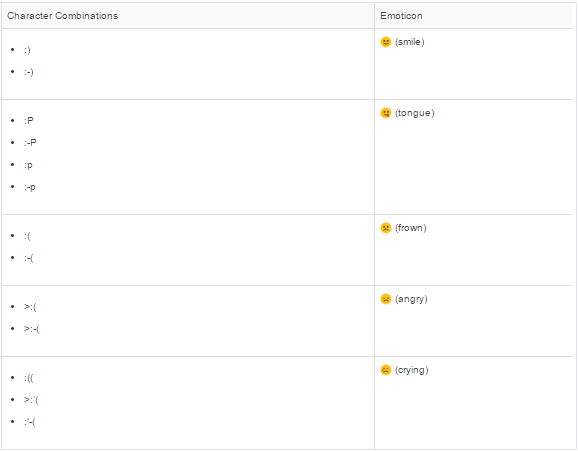
9) Emoticons Added in the Feed

Now your users can add expressions like a smiley face to their posts and comments by typing a character combination

We enabled emoticons by default. However, if you want to disable emoticons, navigate to Setup and click Customize |Chatter | Settings. In the Emoticons in Feed section, deselect Allow Emoticons.

10) Deploy Your Components in Less Time (Generally Available)


You can now deploy components to production by skipping the execution of all Apex tests for components that have been validated within the last four days. With Quick Deploy, you no longer have to wait for all tests to run for your deployment to complete in production, and your deployment will likely finish in less than 30 minutes.
As part of a deployment, all Apex tests are run in production. If the production organization contains many Apex tests, the execution of all tests can be time-consuming and can delay your deployment. To reduce deployment time to production, you can perform a quick deployment by skipping the execution of all tests. Quick deployments are available for change sets and Metadata API components when the following requirements are met.
  • The components have been validated successfully for the target environment within the last four days (96 hours).
  • As part of the validation, all Apex tests in the target organization have passed.
  • The overall code coverage in the organization is at least 75%, and Apex triggers have some coverage.

11) Create or Edit Records Owned by Inactive Users

Previously, only administrators were able to edit accounts, opportunities, and custom object records that are owned by inactive users. With Spring ’15, administrators and all users with the create or edit permission can create or edit accounts, opportunities, and custom object records that are owned by inactive users. For example, you can create an account and assign an inactive user as the record owner. Or you can edit the Account Name field on an opportunity record that is owned by an inactive user to change its parent account.


12)Availability of Compound Fields in Formula Functions Changed

You could previously use compound fields in all formula expressions, but unhandled exceptions would often result. Compound fields have been enabled in the ISNULLISBLANK, and ISCHANGED functions and have been blocked in several other functions so that you won’t encounter these errors.
The following have been blocked from using compound fields.
  • BLANKVALUE
  • CASE
  • NULLVALUE
  • PRIORVALUE
  • The comparison and equality operators: = and == (equal), <> and != (not equal), < (less than), > (greater than), <= (less than or equal), >= (greater than or equal), && (AND), and || (OR)

13)Standard Address Fields Show Google Maps


Records with standard address fields now display a Google Maps image of the address. This saves users time by letting them see where their contacts or accounts are located, instead of having to locate addresses in a separate browser tab.
On a record, go to the detail page to see the Google Maps image on the address field. To generate a map image, an address must include the street and city fields and either the state, postal code, or the country. If an address field is missing any of the required information, a map won’t display

The map image on the address is static, but clicking the map image opens Google Maps in a new browser tab.
Maps on standard address fields are enabled by default. To disable maps for your organization, from Setup in the fullSalesforce site, click Customize | Maps and Locations | Settings and uncheck Enable Maps and Location Services.

Please check below link for more update :-

Thanks,
Amit Chaudhary